The Connected K&B Website: From First Search To First Consultation
Küchen Badezimmer

Steven McMullen
A connected website means your designer sees what the shopper explored online before the first call. Here is how independent K&B retailers close the gap between website and showroom.
It's Tuesday at 9pm. A homeowner types "modern kitchen remodel near me" into Google. She's been researching for weeks, saving screenshots, reading reviews. Tonight she lands on a local kitchen retailer's website.
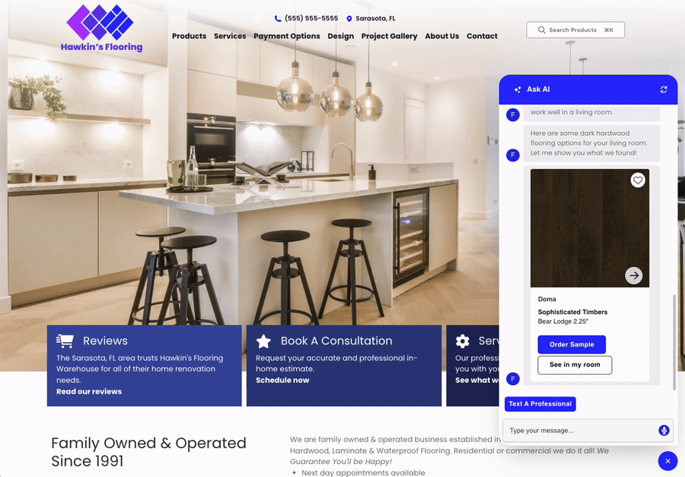
She uploads a photo of her existing kitchen. Within seconds, the site generates three redesign concepts using that retailer's actual cabinet lines, countertop finishes, and price points. She favorites two of them. She has a question about integrated appliances, so she opens the AI chat. It answers with specifics, referencing real products from the retailer's catalog, and captures the conversation. She books a Saturday consultation before closing her laptop.
Monday morning, the designer opens the leads inbox in HomeBase. The lead record shows the photo, the AI-generated concepts, the chat transcript, the favorites, and the appointment time. The designer knows what this shopper has been imagining before they ever pick up the phone.
That is the payoff of a connected website. For most kitchen and bath retailers, it is not what happens today.
Cyncly is the largest platform serving the kitchen, bath, and residential interior design industry, connecting over 13,000 K&B clients across design, sales, and commerce. Cyncly Websites is the website platform built specifically for K&B retailers, connecting the online shopping experience to the design workflow in the showroom.
The Disconnect Most Retailers Live With
Most kitchen and bath retailers run their online presence across three separate efforts: getting found, keeping visitors engaged, and capturing leads. Each effort often runs on a different platform, with a different vendor, and often with generic AI features added after the fact.
The result is predictable. The search listing drives traffic to the website. The website generates some interest, maybe a form submission, maybe a phone call. A name and number land in an inbox somewhere. The design team picks up the phone and starts from scratch: "So, tell me about your project."
All the context the website generated (what the shopper explored, what they responded to, what questions they asked) drops between stages. It never reaches the person who needs it most.
A connected platform changes that equation. When the website, the AI features, and the design workflow all run on one platform, the context carries through every stage. The AI is trained on kitchen and bath catalog and workflow data, not generic image generation. The concepts it produces reference real products. The conversations it captures travel with the lead into the designer's inbox, and then into design software.
Nine Signals That Tell You Where You Stand
Before talking about technology, it helps to know where the gaps are. The following nine questions cover the three stages of a K&B shopper's journey. Answer each one honestly.
Getting found:
- When was your last Google Business Profile review? If it has been more than 30 days, search engines read that as inactivity.
- Are your business name, address, phone number, category, and hours consistent across Google, Houzz, Yelp, and your main directories?
- Does your website have location-specific, category-relevant content that loads fast on mobile?
Keeping shoppers engaged:
- Can a shopper form product preferences on your website after hours, at 9pm on a Tuesday, without speaking to anyone?
- Can they get specific questions answered in real time, with responses tied to your actual product catalog?
- Are those interactions and preferences captured with their lead record?
Turning interest into consultations:
- Does your design team see what a shopper explored on the website before the first call?
- Is channel attribution visible? Do you know which marketing spend drove which leads?
- Do leads move into your design software without manual re-entry of information?
Most retailers count five to eight "no" answers on the first pass. That is not a criticism. It is a reflection of what happens when each stage runs on a separate platform built for a different purpose.
A 90-Day Path From Audit To Evidence
Closing these gaps does not require a multi-year project. A realistic timeline looks like this:
Week 1, Audit. Run the nine-signal diagnostic. Identify which gaps affect your business the most. Review your current search visibility, website engagement, and lead capture process.
Month 1, Connect. Establish the connected platform. Align your web presence with your actual product catalog. Ensure the AI features reference your real ranges, finishes, and pricing. Set up the leads inbox in HomeBase so every inbound contact arrives with context.
Month 2, Build the rhythm. Review responses, content updates, and listing monitoring become a weekly cadence rather than a quarterly scramble. Consistency matters more than volume: five reviews a month and one piece of relevant content a month outperforms a large push every six months.
Month 3, Measure the evidence. Compare consultation quality before and after. Look at how many leads arrive with context attached versus a name and number only. Track whether designers report knowing more about the shopper before the first conversation.
The total human time across this period is approximately 6 hours per person per month, distributed across 2 to 3 people. The designer, the owner, and whoever manages marketing each contribute a small, consistent amount of time.
Why This Matters For Retailers Already Using Design Flex
If you already design in Design Flex in the showroom, Cyncly Websites connects that design experience to your website natively. The lead record that arrives in HomeBase pushes directly into Design Flex, and the shopper's context, favorites, and AI-generated concepts travel with it.
No double entry. No copy-pasting from an email into a design brief. The online experience and the showroom experience run on one platform because they were built to work together.
Cyncly has spent 15 years building websites specifically for the kitchen and bath sector, and holds Google Premier Partner status, placing it in the top 3% of Google Partners. That specialization means the platform is designed around K&B workflows, catalogs, and buying journeys.
Ready to see where your website stands? Get a website assessment and run the nine-signal diagnostic for your business.
Share this article

Related blogs
Homebase just got smarter. Here’s what’s new.
 Bodenbeläge
Küchen
Badezimmer
Bodenbeläge
Küchen
Badezimmer
23.07.2026
Discover Cyncly Websites' June 2026 updates, featuring five powerful lead management upgrades in Homebase and a visual media library grid view.
What software do kitchen designers use? An honest look at the tools professionals rely on
Küchen
21.07.2026
Explore the essential software kitchen designers use, from CAD to specialized platforms like Cyncly Design Flex and Winner Flex.
How to Design a Kitchen Layout: A Step-by-Step Guide for Professionals
Küchen
22.06.2026
Learn how to design a kitchen layout step by step, from measurements and the work triangle to storage planning and 3D visualization.